
Chemin de rendu natif
Affiche les loaders sous forme de vues UIKit et Android au lieu de demander à la WebView d'animer des effets translucides coûteux.
Chemin de rendu natif
Affiche les loaders sous forme de vues UIKit et Android au lieu de demander à la WebView d'animer des effets translucides coûteux.
Placement flexible
Placez les loaders en plein écran, centrés, épinglés à un bord, de style Chrome en haut, ou autour de la WebView avec des insets respectant la safe area.
Loaders intégrés et via assets
Utilisez des loaders de style Siri natif, Siri v2 edge, Chrome top progress, orbit, ring, pulse, dots, bars, wave, halo, image ou basés sur Lottie.
Appelable partout
Déclenchez les loaders depuis JavaScript, Swift, Kotlin ou d'autres plugins natifs via l'API natif public.
| Plateforme | Support | Notes |
|---|---|---|
| iOS | Oui | Natif |
| Android | Oui | Natif |
| Web | Non | Sécurisez avec Capacitor.getPlatform() |
@capgo/capacitor-native-loader sert à charger des états qui doivent rester fluides, translucides et natifs pendant que la WebView est occupée, en cours de redimensionnement, en navigation ou masquée par des surfaces natives.
Utilisez-le quand vous avez besoin de :
| Style | Aperçu |
|---|---|
| Siri |  |
| Siri v2 |  |
| Chrome en haut |  |
| Ring |  |
| Dots |  |
| Bars |  |
| Wave | 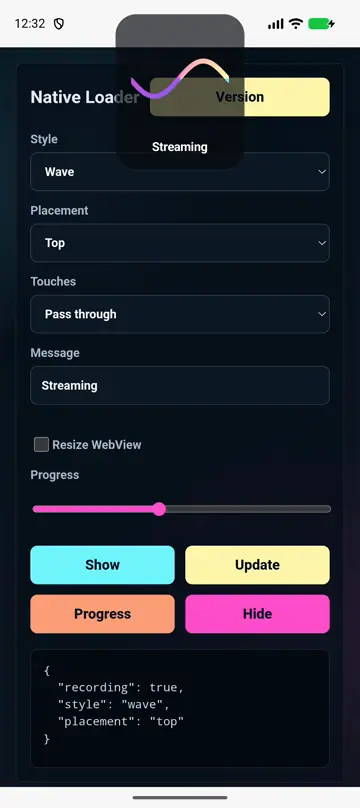 |
| Orbit |  |
| Pulse |  |
| Halo |  |
| Autour | 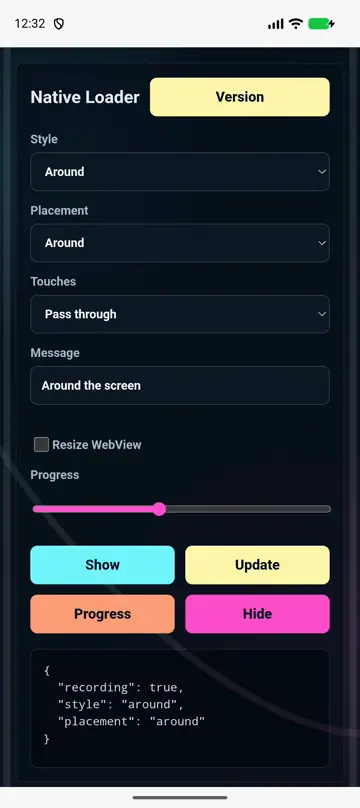 |
| Lottie |  |
| Image |  |
show(options) affiche un loader et retourne son id.update(options) change un loader existant sans supprimer l'overlay.setProgress(options) met à jour la progression d'un loader déterministe.hide(options) supprime un loader.hideAll(options) supprime tous les loaders.setWebViewLayout(options) redimensionne ou ajoute des marges à la WebView/body pour que les loaders natifs puissent s'y placer.resetWebViewLayout(options?) restaure la mise en page originale de la WebView/body.getState() renvoie les IDs des loaders actuellement visibles.configure(options) définit le style, le placement, les couleurs, l'animation et le comportement par défaut.placement contrôle l'endroit où la surface native apparaît :
fullscreen couvre toute l'application, avec option de translucidité.center affiche un loader compact en superposition de la WebView.top, bottom, left, et right épinglez les loaders sur un edge respectant la safe-area.chrome le style utilise une barre native pleine largeur et s'associe bien avec webView.mode: 'resize'.around affiche l'animation du loader autour du cadre de l'écran.custom utilise un cadre explicite pour les workflows de native-plugin ou de split-view.Utilisez interactionMode: 'passThrough' lorsque les utilisateurs peuvent continuer à interagir avec la WebView, block lorsque le chargement doit bloquer les taps, ou loaderOnly lorsque seule la surface du loader doit recevoir les touches.
Si vous utilisez @capgo/capacitor-native-loader pour planifier le comportement des médias et de l'interface natifs, connectez-l’à Premiers pas pour les détails d'implémentation, @capgo/capacitor-native-navigation pour la mise en page native Chrome et WebView, @capgo/capacitor-transitions pour les animations de routes web, et En utilisant @capgo/capacitor-native-loader pour le tutoriel.
Déployez vos apps Capacitor sans attendre
Codez avec votre agent IA, déployez des correctifs en quelques minutes, compilez pour iOS et Android sans Mac, et observez chaque release.
Besoin de l'offre Enterprise ? Parler à notre équipe


